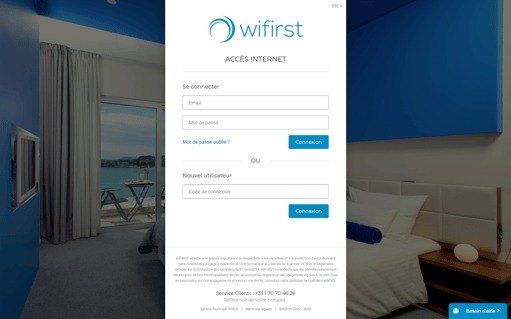
In many student residences across France, internet access is handled through a captive portal called Wifirst. Instead of giving devices normal network access immediately, it interrupts traffic until you go through a login or validation flow in the browser. That might be acceptable for a laptop, but it becomes a real problem when you are trying to run a stable home-style network behind it.
That was my situation in student housing. For almost two years, the connection would work for a while, then the portal session would die randomly, and everything behind my router would quietly lose internet until I logged in again. I also wanted reliable remote access to my LAN, so this was more than a minor annoyance: every time the upstream session expired, remote access disappeared, services dropped offline, and the network stopped behaving like infrastructure.
I route the residence Wi-Fi into a small OpenWrt-based router, which connects to the building network and then re-broadcasts a stable local network for my own devices. What I wanted was simple: keep using the residence Wi-Fi underneath, but make my side of the connection behave like a normal reliable network. When I started looking for a solution, I could not find anyone who had already automated this Wifirst flow, even though the same portal is deployed so widely across student residences in France.
So I built a reconnect flow that runs directly on the router and restores internet access automatically when the captive-portal session dies.
What made the problem interesting
At first glance, captive portals look simple. Open a page, click a button, done. In practice, the visible page was only the surface. Underneath was a JavaScript single-page app making API calls, generating a temporary guest identity, and then submitting hidden credentials to the wireless controller.
That changed the project immediately. A brittle browser macro would have been the wrong tool. What I actually needed was to reproduce the network flow directly from the router with curl, make it idempotent, and verify success from the router itself rather than from some other machine on the side.
- The router had to detect a real loss of internet, not just blindly spam the portal.
- The reconnect logic had to survive redirects, retries, and portal rate limits.
- The proof of success had to come from the router itself, because that was the machine living behind the captive portal.
The flow I reverse engineered
The portal flow turned out to be:
- Fetch an encrypted
box_tokenfromhttps://wireless.wifirst.net/index.txt. - Get the
fragment_idfrom the portal settings API. - POST to
https://portal.wifirst.net/api/guest_userswith a random guest email and the token data. - Read the
radius.loginandradius.passwordvalues from the JSON response. - Submit those credentials to
https://wireless.wifirst.net/goform/HtmlLoginRequest. - Verify internet access again using captive portal detection endpoints.
The detail that mattered most was step 4. A 200 response from /api/guest_users looked promising, but it was not the end of the flow. The router still stayed offline until the hidden login form was submitted. That was the moment the project stopped being “a script that calls an endpoint” and became a proper debugging exercise.
The core script
Below is the core shell flow. It is intentionally simple enough to run on an OpenWrt-class router, but it still handles the parts that matter: outage detection, token retrieval, the two-step login, and verification.
#!/bin/sh
LOGFILE=/tmp/wifirst.log
COOKIE_FILE=/tmp/wifirst_cookies.txt
UA="Mozilla/5.0"
PORTAL_URL="https://portal.wifirst.net"
TOKEN_URL="https://wireless.wifirst.net/index.txt"

log() {
    echo "$(date '+%Y-%m-%d %H:%M:%S'): $1" >> "$LOGFILE"
}

internet_ok() {
    BODY=$(curl -sL --connect-timeout 5 -m 8 -H "User-Agent: $UA" http://captive.apple.com 2>/dev/null || true)
    echo "$BODY" | grep -q "Success" && return 0

    CODE=$(curl -sL --connect-timeout 5 -m 8 -o /dev/null -w "%{http_code}" http://clients3.google.com/generate_204 2>/dev/null || true)
    [ "$CODE" = "204" ] && return 0

    CODE=$(curl -ksS --connect-timeout 5 -m 8 -o /dev/null -w "%{http_code}" https://www.google.com/generate_204 2>/dev/null || true)
    [ "$CODE" = "204" ] && return 0

    return 1
}

get_box_token() {
    curl -ksS --connect-timeout 10 -m 15 -b "$COOKIE_FILE" -c "$COOKIE_FILE" \
        -H "User-Agent: $UA" "$TOKEN_URL"
}

get_fragment_id() {
    SETTINGS=$(curl -ksS --connect-timeout 10 -m 15 -b "$COOKIE_FILE" -c "$COOKIE_FILE" \
        -H "User-Agent: $UA" -H "Accept: application/json" "$PORTAL_URL/api/settings")
    echo "$SETTINGS" | sed -n 's/.*"fragments_ids":{[^}]*"0":\([0-9][0-9]*\).*/\1/p' | head -1
}

submit_guest_user() {
    BOX_TOKEN="$1"
    FRAGMENT_ID="$2"
    EMAIL="$(date +%s)@guest.com"

    JSON=$(printf '{"box_token":"%s","fragment_id":%s,"guest_user":{"email":"%s","cgu":true}}' \
        "$BOX_TOKEN" "$FRAGMENT_ID" "$EMAIL")

    curl -ksS --connect-timeout 10 -m 15 -b "$COOKIE_FILE" -c "$COOKIE_FILE" \
        -H "User-Agent: $UA" \
        -H "Content-Type: application/json" \
        -H "Accept: application/json" \
        -H "Origin: $PORTAL_URL" \
        -H "Referer: $PORTAL_URL/" \
        -H "X-Requested-With: XMLHttpRequest" \
        -X POST "$PORTAL_URL/api/guest_users" \
        -d "$JSON"
}

submit_radius_login() {
    LOGIN="$1"
    PASSWORD="$2"

    curl -ksS --connect-timeout 10 -m 20 \
      -X POST 'https://wireless.wifirst.net/goform/HtmlLoginRequest' \
      -d "username=$LOGIN" \
      -d "password=$PASSWORD" \
      -d 'success_url=https://portal.wifirst.net/' \
      -d 'error_url=https://portal.wifirst.net/' \
      -d 'update_session=0'
}

main() {
    if internet_ok; then
        log "Internet already working"
        exit 0
    fi

    rm -f "$COOKIE_FILE"
    BOX_TOKEN=$(get_box_token)
    FRAGMENT_ID=$(get_fragment_id)

    RESPONSE=$(submit_guest_user "$BOX_TOKEN" "$FRAGMENT_ID")
    LOGIN=$(echo "$RESPONSE" | sed -n 's/.*"login":"\([^"]*\)".*/\1/p' | head -1)
    PASSWORD=$(echo "$RESPONSE" | sed -n 's/.*"password":"\([^"]*\)".*/\1/p' | head -1)

    [ -n "$LOGIN" ] || exit 1
    [ -n "$PASSWORD" ] || exit 1

    submit_radius_login "$LOGIN" "$PASSWORD" >/tmp/wifirst-login-response.txt 2>&1
    sleep 3

    if internet_ok; then
        log "Reconnect successful"
        exit 0
    fi

    log "Reconnect failed"
    exit 1
}

main
How I wired it into the router
I wanted the router to reconnect automatically after the WAN came back, not just when I manually ran a script over SSH. So I tied it into the system in two places:
- A hotplug hook that runs when the WAN interface comes up.
- A cron job that gives it another chance every minute in case the portal state changes after boot.
The hotplug hook was tiny:
#!/bin/sh
[ "$ACTION" = ifup ] || exit 0

case "${INTERFACE:-}" in
    wwan|wan|wwan6)
        (
            /root/wifirst-connect.sh >/tmp/wifirst-hotplug.log 2>&1
            /usr/bin/wgclient-guard.sh
        ) &
        ;;
    wgclient)
        /usr/bin/wgclient-guard.sh
        ;;
    *)
        exit 0
        ;;
esac
And the cron job was just:
* * * * * /root/wifirst-connect.sh >> /tmp/wifirst.log 2>&1This combination works well because it is deliberately boring. The router gets an immediate reconnect attempt when the interface comes up, and the cron job quietly covers the cases where the portal state drifts or the session expires later.
How to set it up yourself
- Copy the main script to your router as
/root/wifirst-connect.sh. - Make it executable with
chmod +x /root/wifirst-connect.sh. - Create the hotplug hook under
/etc/hotplug.d/iface/98-portal-guardand make that executable too. - Add the cron entry so the reconnect logic gets periodic retries.
- Reboot the router or bounce the WAN interface to confirm the hook runs automatically.
- Run a real outage test from the router, not from your laptop or server.
That last step matters. It is easy to fool yourself with automation like this. A forced portal submit proves that the HTTP flow still works. It does not prove that the router can recover from a real outage on its own. The honest test is to invalidate the session from the router, watch internet checks fail, and then verify that the reconnect script restores service.
What I learned
The technical lesson was straightforward: when a web flow is actually an API flow, copy the protocol, not the pixels. Reverse engineering the network requests gave me something smaller, faster, and more reliable than trying to drive a browser on a tiny router.
The more important lesson was about engineering habits. I had to think about failure modes before I thought about convenience. How do you verify success from the right machine? What does a real reconnect test look like? How do you avoid claiming the problem is solved when you have only proved one happy path?
What mattered most in the end was not the size of the script but the fact that the fix held up under real conditions. The useful part of the project was understanding the system, testing the point where it actually failed, and iterating until the connection recovered reliably.